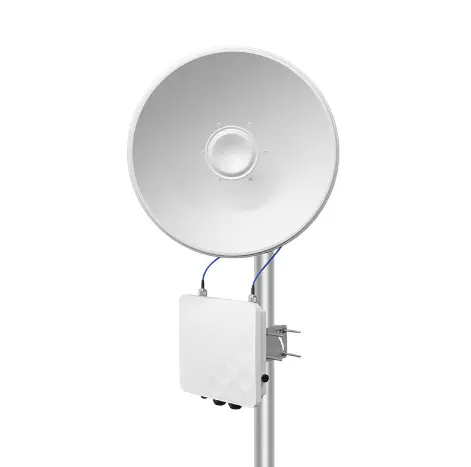
A WISP operator in Manila replaced his 5.8GHz backbone links with 6GHz bridges expecting a “free” throughput boost. The new bridges delivered 30% higher peak speed in testing. In production, the improvement was less than 10% — his bottleneck was the internet uplink, not the wireless link.
He spent $3,000 replacing equipment that was working fine. The 5.8GHz bridges he removed had been delivering 500 Mbps on a 200 Mbps internet pipe. The 6GHz bridges now delivered 650 Mbps on the same 200 Mbps pipe. His subscribers noticed zero difference.
Wi-Fi 6E (6GHz) bridges are genuinely better technology. But “better technology” does not always mean “better investment.” This guide covers when the upgrade delivers real value and when you should keep running 5GHz.
What Does 6GHz Actually Change?
More spectrum, wider channels
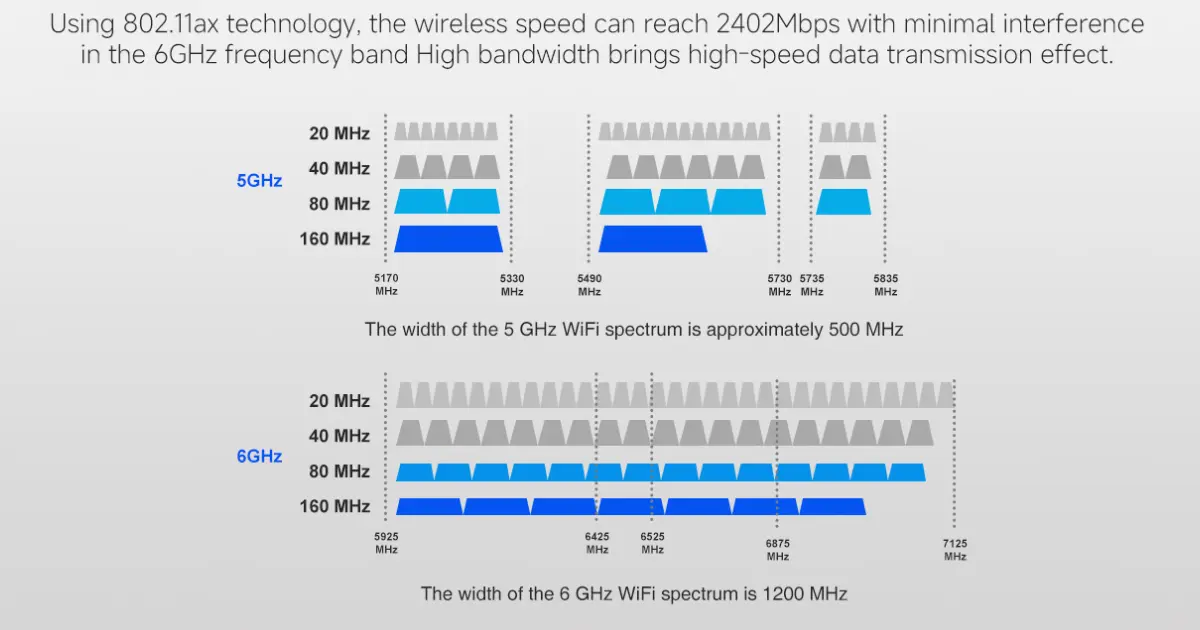
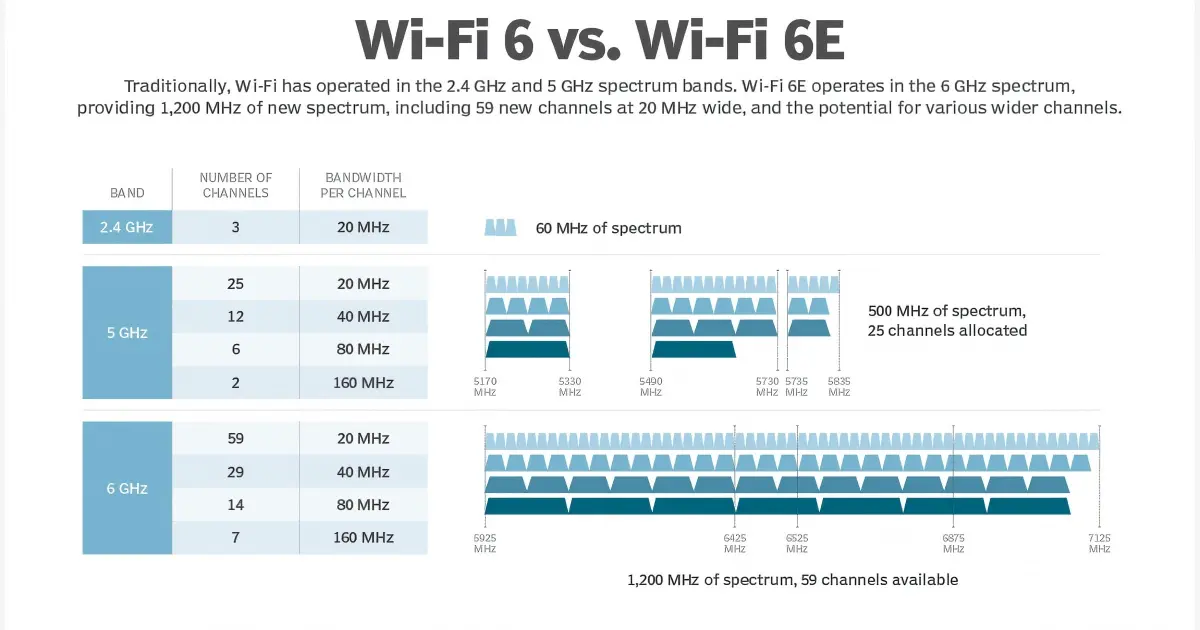
The full 6GHz allocation spans 5.925–7.125GHz and can provide up to 1,200MHz of spectrum, but the portion available for outdoor use differs by country. Where the full allocation and standard-power outdoor operation are permitted, this means:
| Metric | 5GHz | 6GHz | Improvement |
|---|---|---|---|
| Available spectrum | 500MHz | 1,200MHz | 2.4x |
| 160MHz channels | 2 (with DFS) | 7 | 3.5x |
| Non-overlapping 80MHz channels | 6 | 14 | 2.3x |
| Maximum PHY rate (2x2 MIMO) | 2,402 Mbps | 2,402 Mbps | Same |
| Maximum PHY rate (4x4 MIMO) | 4,804 Mbps | 4,804 Mbps | Same |
Important: the PHY rate is the same at the same channel width and MIMO configuration. 6GHz does not make the radio faster — it gives the radio more clean channels to use.
Clean spectrum (for now)
5.8GHz is crowded. In urban and suburban areas, dozens of WiFi networks, wireless bridges, and other devices compete for the same channels. This interference raises the noise floor and reduces effective throughput.
6GHz is nearly empty today. No legacy devices operate there. A 6GHz bridge gets a clean channel with minimal interference — resulting in higher real-world throughput and more stable connections.
The caveat: 6GHz will not stay empty forever. As Wi-Fi 6E and Wi-Fi 7 devices proliferate, the spectrum will fill up. The “clean channel” advantage is a 3-5 year window, not a permanent benefit.
Different coordination rules
5GHz bridges on DFS channels must detect protected radar systems and may be forced to change channel. This can interrupt a link and reduces the channels available near radar installations.
6GHz does not simply remove regulatory coordination. Depending on the country and power class, outdoor standard-power operation may require an automated frequency-coordination system or may not be permitted at all. Treat cleaner spectrum as a potential benefit only after confirming the applicable local rules.
When Should You Upgrade to a 6GHz Bridge?
Scenario 1: Dense urban PtP links
If you are operating multiple bridge links in an urban area where 5.8GHz is congested, 6GHz provides clean spectrum that eliminates the interference dragging down your 5GHz links.
Signs you need 6GHz:
- Your 5GHz bridge throughput has dropped 20-30% over the past 2 years (more devices competing)
- Spectrum scans show 10+ other 5GHz networks visible from your bridge location
- You experience periodic throughput drops that correlate with neighboring network activity
- DFS events force frequent channel changes, causing brief disconnections
Scenario 2: Short-range, maximum throughput
6GHz is often selected for shorter, high-throughput links because clean spectrum makes wide channels easier to use. Frequency alone does not set the maximum distance: antenna gain, EIRP limits, Fresnel clearance, noise floor, and the required fade margin determine the usable link.
For links under 5km where you need maximum throughput — data center interconnects, building-to-building backbone in a campus, high-bandwidth backhaul for dense AP clusters — 6GHz with 160MHz channels delivers the highest real-world speeds.
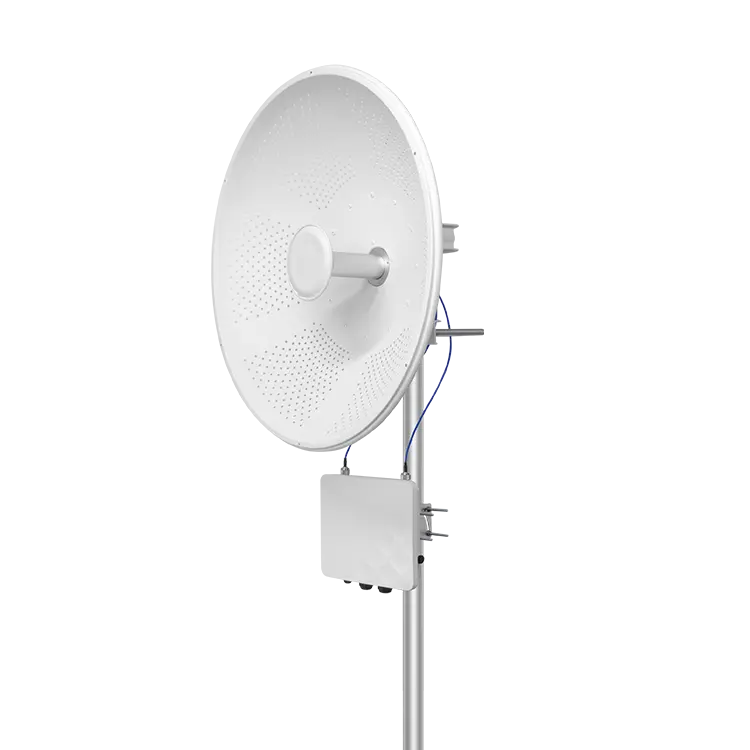
The WB6axH6-20 is a high-gain 6GHz wireless bridge with a built-in 33dBi parabolic dish. Its product specification targets 20km+ clear-line-of-sight links and 900+ Mbps actual point-to-point throughput. Final throughput still depends on legal channel availability, channel width, interference, alignment, and link margin.
Scenario 3: Future-proofing new installations
If you are installing a brand-new bridge link, a WiFi 6E bridge is worth evaluating when 5GHz congestion is measurable and outdoor 6GHz operation is permitted. Compare both bands with the same throughput target and fade margin instead of choosing solely by distance or PHY rate.
When Should You Stay on 5GHz?
Long range links
At the same distance, 6GHz has slightly more free-space path loss than 5.8GHz, but the frequency difference does not add a fixed loss for every kilometre. The practical decision is dominated by legal EIRP, antenna gain, channel availability, interference, and the fade margin required for the target availability.
For many 10–30km projects, 5GHz bridges like the WB5axH6-35 remain the lower-risk choice because outdoor rules and channel planning are better established. Where outdoor 6GHz is permitted and the spectrum advantage is material, the 33dBi WB6axH6-20 can also be evaluated with a site-specific link budget.
Rural areas with no interference
If your 5GHz bridge is in a rural area with no competing signals, you are already getting clean spectrum. Switching to 6GHz gains you nothing — the interference advantage disappears when there is no interference to avoid.
Existing links working well
If your 5GHz bridge delivers the throughput you need reliably, there is no ROI in replacing it. Equipment replacement has a cost (new hardware, installation labor, downtime during cutover) that is only justified if the new equipment solves an actual problem.
The WISP operator in Manila learned this the hard way. His 5GHz links were not the bottleneck — his internet uplink was. Upgrading the bridges did not improve what his subscribers actually experienced.
Regulatory uncertainty
6GHz regulations vary by country and are still evolving. In some countries, 6GHz outdoor use is restricted or requires low power (LPI — Low Power Indoor) mode. Before deploying outdoor 6GHz bridges, verify that your country permits standard-power outdoor operation on 6GHz.
Do not infer outdoor permission from consumer Wi-Fi 6E availability. Confirm the permitted sub-band, power class, coordination requirements, antenna restrictions, and maximum EIRP for the installation country before ordering hardware.
How Do 6GHz and 5GHz Bridges Compare?
| Spec | WB6axH6-20 (6GHz) | WB5axH6-35 (5GHz) | WB5acH6-29 (5GHz) |
|---|---|---|---|
| Frequency | 6GHz | 5GHz | 5GHz |
| Standard | Wi-Fi 6E (802.11ax) | Wi-Fi 6 (802.11ax) | 802.11ac Wave 2 |
| Antenna gain | 33dBi | 33dBi | 29dBi |
| Max throughput (real) | 900+ Mbps under suitable link conditions | 900+ Mbps under suitable link conditions | Up to 500 Mbps under suitable link conditions |
| Rated range | 20km+ LoS | 20km+ LoS | Up to 20km LoS |
| DFS required | No | Yes (5.25-5.725GHz) | Yes |
| Spectrum congestion | Clean (today) | Increasingly congested | Congested in urban |
| IP rating | IP67 | IP67 | IP67 |
| Best for | Clean-spectrum PtP where outdoor 6GHz is permitted | Long-range backbone and broad regional compatibility | Cost-sensitive mid/long-range links |
Which Bridge Should You Choose?
| Your Situation | Recommended |
|---|---|
| New link, under 5km, urban | 6GHz (WB6axH6-20) |
| New link, under 5km, rural | 5GHz (cost savings, no interference anyway) |
| New link, 5-15km | Compare 5GHz with high-gain 6GHz using local rules and a link budget |
| New link, 15-30km | 5GHz (WB5axH6-35) |
| Replace existing 5GHz, urban congestion | 6GHz (WB6axH6-20) |
| Replace existing 5GHz, working fine | Do not replace |
| Multiple links on same tower, urban | 6GHz (more non-overlapping channels) |
For bridge selection by distance and CCTV camera count, see our CCTV wireless bridge buying guide. For antenna selection at long range, see our directional vs omnidirectional antenna guide.
Next Steps: Evaluate Your 6GHz Upgrade
Before spending on new equipment:
- Run a spectrum scan at your bridge location — if you see fewer than 5 competing 5GHz networks, congestion is not your problem
- Check your bottleneck — if your internet uplink is slower than your current bridge throughput, upgrading the bridge changes nothing
- Build a link budget — include antenna gain, legal EIRP, Fresnel clearance, cable loss, noise floor, and fade margin for both bands
- Compare the cost — the WB6axH6-20 is 20-30% more than comparable 5GHz bridges
Need help deciding? Send us your current bridge model, link distance, and throughput requirements — we will tell you honestly whether 6GHz improves your situation.
Talk to Our Engineers on WhatsApp
Featured in this guide
Frequently Asked Questions
Practical answers for planning a similar network.
Is Wi-Fi 6E faster than Wi-Fi 6 for wireless bridges?
How far can a 6 GHz wireless bridge reach?
Do I need a license for a 6 GHz outdoor wireless bridge?
Can I use 6 GHz bridges in rainy climates?
Is it worth upgrading working 5 GHz bridges to 6 GHz?
Plan the complete link
Get a point-to-point wireless bridge kit recommendation
Tell us the distance, throughput, power source, and deployment environment. We will match the bridge pair, PoE, outdoor cable, and mounting accessories.
Continue Planning Your Wireless Link
Deploy with confidence
See how MossLink builds ISP CPE & Hotspot Deployment Solution end-to-end
Network architecture, products used, and real-world results in one place.
Tags
Share